 Image 1 of 5
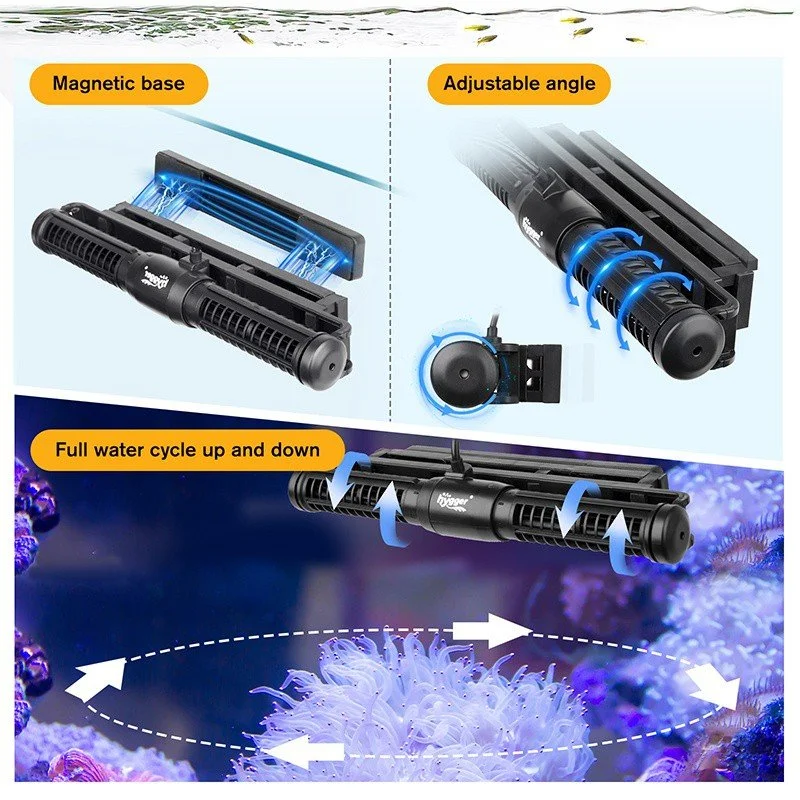 Image 2 of 5
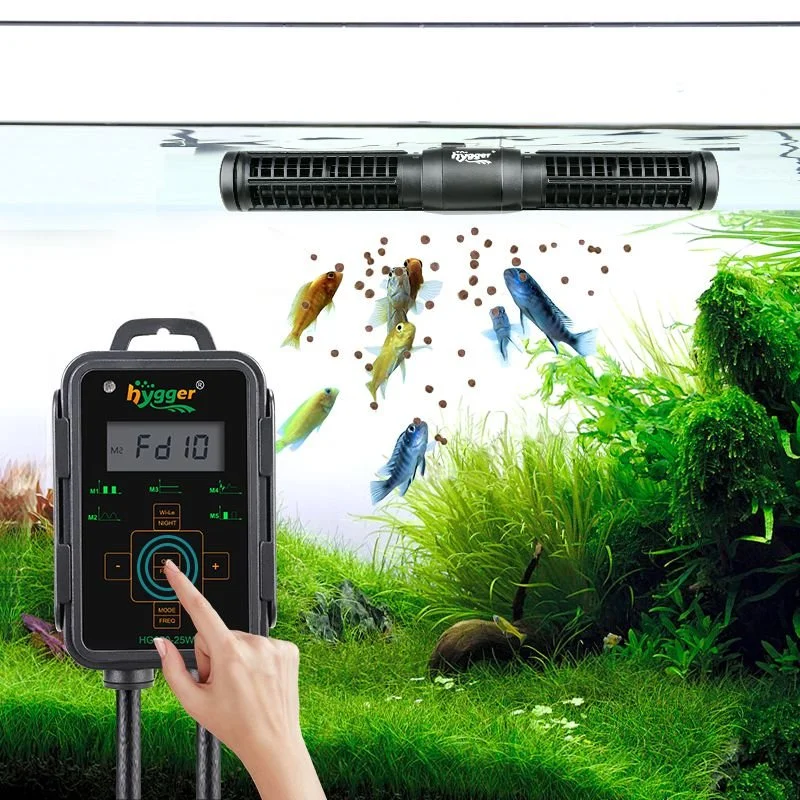 Image 3 of 5
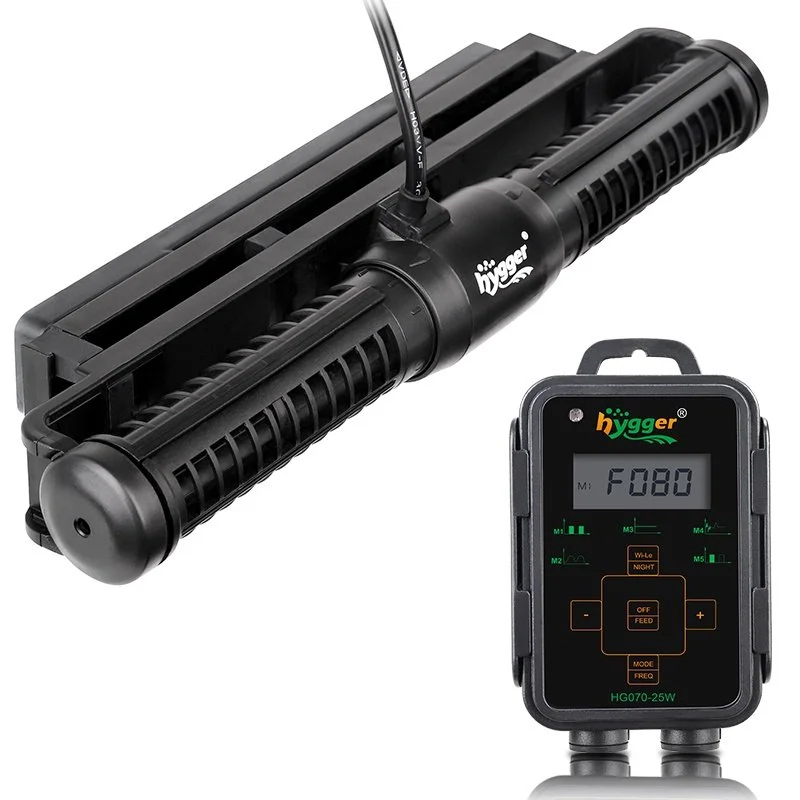 Image 4 of 5
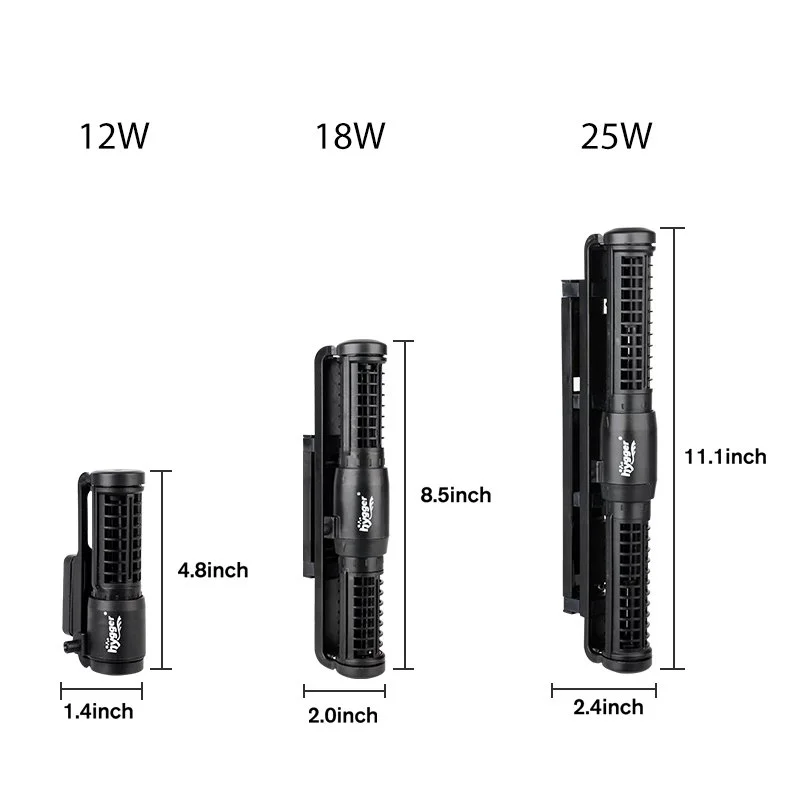 Image 5 of 5
Hygger Cross Flow Pump HG070
Order processing time: 3–5 business days
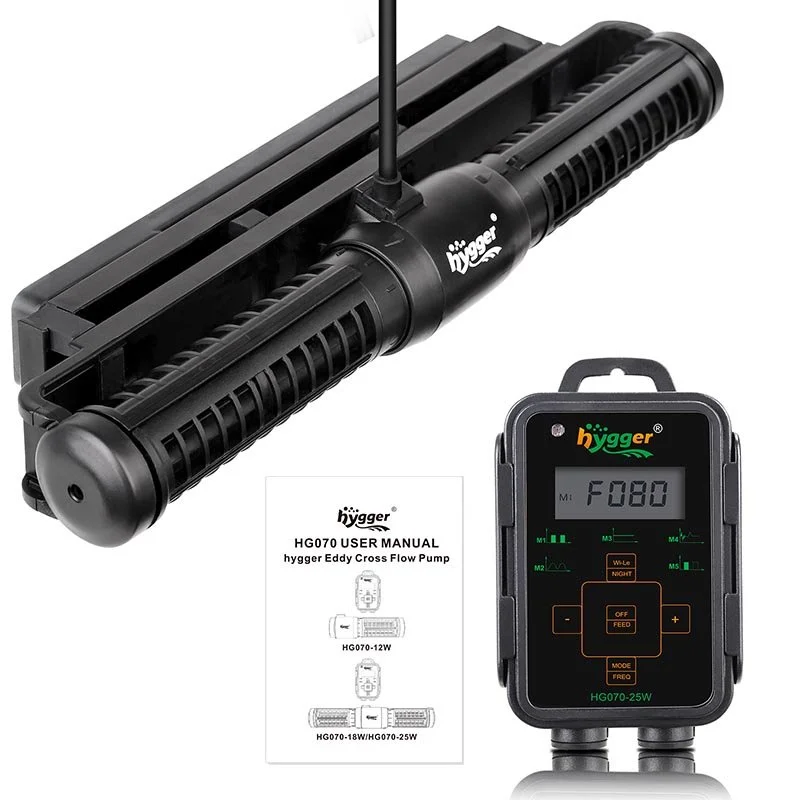
Create powerful, natural-looking water movement throughout your aquarium with the Hygger Cross Flow Pump HG070, an advanced aquarium wavemaker designed to simulate ocean currents, improve water circulation, and reduce stagnant areas in freshwater and saltwater aquariums.
Featuring an innovative cross-flow design, five adjustable wave modes, an intelligent LCD controller, wireless synchronization between compatible HG070 pumps, and convenient feeding and nighttime functions, the Hygger HG070 delivers versatile water movement for fish, corals, and aquatic plants.
Unlike traditional aquarium powerheads that produce a concentrated stream of water, the HG070 uses an elongated cylindrical design to generate a broad, sweeping current. This wider flow pattern helps move water through larger aquarium areas, around rock formations, and across the water surface.
Available in 12W, 18W, and 25W models, the Hygger HG070 provides maximum flow rates ranging from 1,321 GPH to 2,380 GPH, making it suitable for compatible aquariums up to approximately 60, 135, or 265 gallons, depending on the selected model.
With adjustable flow intensity, customizable wave frequency, a magnetic mounting system, and energy-efficient 24V DC operation, the Hygger HG070 offers a practical solution for aquarium owners seeking stronger circulation and more natural aquatic conditions.
Whether you're maintaining a large freshwater aquarium, creating dynamic water movement in a reef tank, improving circulation around live rock, or upgrading a conventional aquarium powerhead, the Hygger HG070 provides advanced wave control in a compact, easy-to-use system.
Benefits of the Hygger Cross Flow Pump HG070
Advanced Cross-Flow Technology: Creates broad, sweeping currents rather than a narrow stream of water.
Five Selectable Wave Modes: Choose Classic Wave Pulse, Sine Wave, Constant Wave, Random Wave, or Classic Wave Cross-Flow.
Three Available Models: Select 12W, 18W, or 25W to match your aquarium requirements.
Powerful Water Movement: Delivers maximum flow rates of 1,321, 1,850, or 2,380 GPH.
Suitable for Freshwater and Saltwater: Designed for compatible freshwater, marine, and reef aquariums.
Intelligent LCD Controller: Conveniently adjust operating modes, flow settings, and wave frequency.
Adjustable Flow Intensity: Customize circulation according to the selected operating mode.
Adjustable Wave Frequency: Fine-tune supported wave patterns to suit aquarium dimensions and livestock.
Wireless Master/Slave Synchronization: Coordinate multiple compatible HG070 pumps without a separate communication cable.
10-Minute Feeding Mode: Temporarily stops water movement during feeding.
Automatic Night Mode: Reduces circulation to the lowest constant-flow setting when the controller detects darkness.
Key Lock Function: Prevents accidental changes to controller settings.
Magnetic Mounting System: Provides convenient installation on compatible aquarium glass.
Flexible Pump Positioning: Install near the surface, middle, or lower section of the aquarium.
Low-Voltage DC Operation: Uses an energy-efficient 24V DC pump system.
Helps Reduce Stagnant Areas: Improves water movement around aquarium decorations and rockwork.
Advanced Cross-Flow Aquarium Technology
The Hygger HG070 uses a cylindrical cross-flow design to generate broad water movement throughout the aquarium.
Traditional powerheads typically direct water through a relatively narrow outlet. Cross-flow pumps distribute water across a wider area, creating a sweeping current that can more closely resemble certain natural water movements.
Broad Water Distribution
The elongated pump body moves water across a wider section of the aquarium.
Natural-Looking Currents
The HG070 can create pulsing, alternating, random, and continuous water movement.
Improved Circulation Around Rockwork
Broad currents help move water around aquarium decorations and live rock structures.
Reduced Low-Flow Areas
Correct placement can help reduce stagnant zones where debris accumulates.
Flexible Aquarium Circulation
The different operating modes allow users to create flow patterns suited to their aquarium's size and inhabitants.
Reef Aquarium Applications
Cross-flow circulation is particularly useful in marine aquariums where water movement is important for many corals and other organisms.
Five Customizable Wave Modes
The Hygger HG070 features five operating modes controlled through its intelligent LCD controller.
Each mode produces a different water movement pattern.
M1 – Classic Wave Pulse Mode
Classic Wave Pulse Mode creates repeated pulses of water movement.
The flow intensity and wave frequency can be adjusted using the controller.
Ideal applications include:
Creating rhythmic aquarium currents
Producing visible surface movement
Simulating repeated wave action
Adding circulation to compatible reef aquariums
M2 – Sine Wave Mode
Sine Wave Mode gradually changes the flow intensity in a smooth, wave-like pattern.
The manufacturer describes flow variation between approximately 30% and 100% during this mode.
Ideal applications include:
Creating smoother changes in water movement
Reducing abrupt transitions between flow levels
Producing natural-looking aquarium currents
Supporting compatible marine and reef environments
M3 – Constant Wave Mode
Constant Wave Mode provides continuous water movement at a selected flow setting.
The flow rate can be adjusted using the controller's plus and minus buttons.
Ideal applications include:
Steady freshwater aquarium circulation
Continuous movement around aquarium decorations
Maintaining a predictable directional current
Supplementing aquarium filtration
M4 – Random Wave Mode
Random Wave Mode changes pump output irregularly.
This creates a less predictable circulation pattern.
Ideal applications include:
Simulating variable ocean currents
Producing changing water movement around rockwork
Reducing reliance on one constant flow pattern
Supporting compatible mixed reef aquariums
M5 – Classic Wave Cross-Flow Mode
Classic Wave Cross-Flow Mode provides a programmable cross-flow wave pattern.
Users can adjust flow intensity and wave frequency through the controller.
Ideal applications include:
Creating dynamic aquarium currents
Improving circulation across larger aquarium areas
Producing changing flow patterns
Enhancing water movement in compatible reef systems
Choosing the Best Mode
The ideal wave mode depends on aquarium dimensions, livestock, decorations, and existing filtration.
Begin with moderate flow and observe how fish, plants, and corals respond before increasing intensity.
Intelligent LCD Controller
The HG070 includes a dedicated LCD controller that allows users to manage the pump's operating functions.
Clear Operating Display
The LCD displays the selected wave mode and other operating information.
Mode Selection
Switch between the five available wave patterns.
Flow Adjustment
Increase or decrease the selected pump output.
Frequency Adjustment
Change the wave frequency in supported modes.
Feeding Mode
Temporarily pause the pump during feeding.
Night Mode
Automatically reduce water movement when the controller detects low-light conditions.
Wireless Linkage
Configure compatible pumps for synchronized operation.
Key Lock
Prevent accidental changes to settings.
Error Indicators
The controller displays diagnostic codes when certain operating problems are detected.
Important: The HG070 uses a dedicated LCD controller. It does not require a smartphone app or Wi-Fi network for its standard operating functions.
Adjustable Water Flow and Wave Frequency
The Hygger HG070 allows users to customize circulation according to their aquarium's needs.
Adjustable Flow Intensity
Use the controller's plus and minus buttons to change pump output.
Variable-Frequency Operation
The pump uses a variable-frequency DC motor to produce different flow patterns.
Customizable Wave Timing
In supported modes, press and hold the MODE/FREQ button to adjust wave frequency.
Flexible Current Strength
Reduce flow for compatible fish and corals that prefer gentler water movement.
Increase flow where stronger circulation is appropriate.
Important Flow Consideration
The maximum GPH rating represents the pump's highest specified flow output.
Actual circulation depends on the selected mode, flow setting, and installation conditions.
Three Available Hygger HG070 Models
The HG070 series is available in three versions.
HG070-12W – 1,321 GPH
The HG070-12W is the most compact model in the series.
Model Highlights:
Model: HG070-12W
Power Consumption: 12W
Maximum Flow Rate: 1,321 GPH
Metric Flow Rate: 5,000 L/H
Manufacturer-Recommended Aquarium Capacity: Up to 60 gallons
Manufacturer-Recommended Aquarium Length: Up to approximately 60 cm / 23.6 inches
Maximum Recommended Glass Thickness: 0.315 inches / 8 mm
Approximate Pump Dimensions: 4.8 × 1.4 inches / 12.2 × 3.6 cm
Operating Voltage: DC 24V
The 12W model is suitable for compatible smaller reef systems and freshwater aquariums requiring broad circulation.
HG070-18W – 1,850 GPH
The HG070-18W provides increased water movement for larger aquarium systems.
Model Highlights:
Model: HG070-18W
Power Consumption: 18W
Maximum Flow Rate: 1,850 GPH
Metric Flow Rate: 7,000 L/H
Manufacturer-Recommended Aquarium Capacity: Up to 135 gallons
Manufacturer-Recommended Aquarium Length: Up to approximately 80 cm / 31.5 inches
Maximum Recommended Glass Thickness: 0.39 inches / 10 mm
Approximate Pump Dimensions: 8.5 × 2 inches / 21.6 × 5 cm
Operating Voltage: DC 24V
The 18W model is designed for compatible medium to large freshwater aquariums, marine displays, and reef systems.
HG070-25W – 2,380 GPH
The HG070-25W is the highest-output model in the series.
Model Highlights:
Model: HG070-25W
Power Consumption: 25W
Maximum Flow Rate: 2,380 GPH
Metric Flow Rate: 9,000 L/H
Manufacturer-Recommended Aquarium Capacity: Up to 265 gallons
Manufacturer-Recommended Aquarium Length: Up to approximately 100 cm / 39.4 inches
Maximum Recommended Glass Thickness: 0.47 inches / 15 mm
Approximate Pump Dimensions: 11.1 × 2.4 inches / 28.2 × 6 cm
Operating Voltage: DC 24V
The 25W model is suitable for compatible larger aquarium systems requiring stronger cross-flow circulation.
Important Model Selection Note
Hygger publishes both aquarium capacity and aquarium length recommendations.
Choose the pump based on tank volume, dimensions, glass thickness, and livestock requirements, rather than relying on gallon capacity alone.
A long aquarium with complex rockwork may require a different circulation arrangement than a shorter aquarium of the same volume.
Wireless Master/Slave Synchronization
The HG070 supports wireless linkage between multiple compatible pumps.
This feature allows aquarium owners to coordinate circulation in larger systems.
Master Controller
One HG070 controller can be designated as the master.
The master controller manages the operating settings for the linked pump group.
Slave Controller
Additional compatible HG070 pumps can be configured as slave units.
The slave pumps follow the master controller's operating pattern.
No Communication Cable Required
The wireless linkage operates between compatible pump controllers without requiring a separate inter-controller cable.
Coordinated Water Movement
Linked pumps can create synchronized circulation patterns across the aquarium.
Suitable for Larger Aquariums
Using multiple pumps can help improve circulation in longer or more complex aquarium layouts.
Important Wireless Clarification
The HG070's wireless function is designed for communication between compatible pump controllers.
It should not be confused with smartphone Bluetooth control, Wi-Fi control, or internet-based remote operation.
Convenient 10-Minute Feeding Mode
The HG070 includes a feeding function that temporarily stops water movement.
Easier Fish Feeding
Strong currents can move food around the aquarium before fish have an opportunity to eat.
Automatic Pump Pause
Press and hold the OFF/FEED button to activate Feeding Mode.
Controller Countdown
The display shows a countdown beginning at approximately Fd10.
Automatic Restart
After ten minutes, the pump automatically resumes its previous operating settings.
Manual Restart
Feeding Mode can be canceled before the countdown finishes.
Practical Aquarium Maintenance
The temporary pause can also be useful during selected short aquarium tasks.
Important: Feeding Mode stops the HG070 circulation pump. It does not automatically stop separate aquarium filters, return pumps, or feeding equipment.
Automatic Night Mode
The HG070 features a Night Mode designed to reduce water movement in low-light conditions.
Light-Sensitive Operation
The controller detects changes in ambient light.
Reduced Nighttime Flow
When Night Mode is enabled and the surrounding area becomes dark, the pump switches to Constant Wave Mode at its lowest flow setting.
Automatic Daytime Return
When the controller detects brighter conditions, the pump returns to its previously selected operating mode.
Convenient Daily Operation
Night Mode provides an automatic way to alternate between normal daytime circulation and gentler nighttime flow.
Important Installation Consideration
The controller must be positioned where its light sensor can detect the intended day-and-night lighting conditions.
Avoid placing it in a permanently dark cabinet if you want Night Mode to follow the aquarium's lighting cycle.
Important Livestock Consideration
Some reef aquariums require substantial circulation throughout the night.
Use Night Mode only when the reduced flow remains appropriate for the aquarium's inhabitants.
Controller Key Lock Function
The HG070 includes a locking function to help prevent accidental setting changes.
Prevent Unwanted Adjustments
The lock helps protect the selected wave mode and flow settings.
Simple Activation
Press and hold the plus and minus buttons together until the lock icon appears.
Easy Unlocking
Press and hold the same buttons until the lock icon disappears.
Useful for Everyday Operation
The feature is particularly convenient when the controller is installed in an accessible location.
Broad Aquarium Water Circulation
The HG070 helps distribute water throughout the aquarium.
Surface Circulation
Position the pump near the upper section of the aquarium to create surface movement.
Mid-Level Circulation
Mounting the pump at mid-level can move water through the primary swimming area.
Lower-Level Circulation
A lower position can help move loose debris near the substrate.
Around Aquarium Decorations
The broad current can improve circulation around rocks and driftwood.
Through Reef Rockwork
Properly directed cross-flow helps move water around live rock structures.
Reduced Stagnant Areas
Additional circulation can help minimize low-flow pockets.
Helps Support Oxygen Exchange
Water movement plays an important role in aquarium gas exchange.
Surface Agitation
Water movement near the surface can increase gas exchange.
Oxygen Distribution
Circulation helps distribute dissolved oxygen through different aquarium areas.
Reduced Stagnation
Moving water helps prevent isolated areas from remaining still.
Supports Aquarium Filtration
Circulation complements existing filtration and aeration equipment.
Important: The HG070 circulates water but does not directly inject air. It is not a replacement for an air pump when dedicated aeration is required.
Helps Keep Loose Debris Moving
Waste particles often collect in low-flow aquarium areas.
The HG070 can help move suspended debris toward the filtration system.
Reduces Debris Accumulation
Appropriate water movement can discourage lightweight waste from settling in certain locations.
Supports Mechanical Filtration
Suspended particles may be captured by the aquarium's filter.
Improves Flow Around Decorations
Broad circulation can help move water through areas behind rockwork.
Useful in Reef Aquariums
Water movement around live rock can help reduce stagnant areas.
Important Maintenance Note
The HG070 is a circulation pump, not a mechanical filter.
It does not remove waste from the aquarium by itself.
Regular water changes, filtration, and substrate cleaning remain necessary.
Suitable for Freshwater Aquariums
The HG070 can be used in compatible freshwater systems.
Large Community Aquariums
Additional circulation can help distribute water throughout larger fish tanks.
River-Style Aquariums
The adjustable modes can create stronger currents for species that naturally inhabit flowing water.
Cichlid Aquariums
Selected cichlid species may benefit from increased water movement.
Large Planted Aquariums
Carefully adjusted circulation can help distribute water around aquatic plants.
Aquariums with Extensive Decorations
Cross-flow circulation can help reach areas behind rocks and driftwood.
Freshwater Flow Consideration
Some freshwater fish and plants prefer calmer conditions.
Avoid excessive currents in aquariums containing delicate fish, shrimp, or plants.
Suitable for Saltwater and Reef Aquariums
The HG070 is particularly useful for marine aquarium circulation.
Reef Aquariums
Variable water movement can help provide appropriate circulation around corals.
Soft Coral Systems
Adjustable wave modes allow flow patterns to be selected according to the needs of compatible soft corals.
LPS Coral Aquariums
Carefully positioned circulation can provide water movement without directing excessive current at delicate coral tissue.
SPS Coral Aquariums
Many SPS corals benefit from substantial and variable water movement.
Marine Fish Displays
Broad currents help move water through rock structures and open swimming areas.
Live Rock Aquariums
Cross-flow circulation can help reduce stagnant zones around reef rockwork.
Important Reef Consideration
Different corals require different flow intensities.
Avoid directing an overly powerful current at delicate coral tissue.
Magnetic Aquarium Mounting System
The HG070 includes a magnetic mounting system designed for compatible aquarium glass.
Secure Attachment
The magnetic base holds the pump against the aquarium wall.
Convenient Installation
No drilling or permanent modification is required.
Flexible Positioning
The pump can be moved to different locations as circulation needs change.
Adjustable Direction
The pump's mounting design allows users to adjust the flow direction.
Model-Specific Glass Thickness Limits
HG070-12W: Up to 8 mm
HG070-18W: Up to 10 mm
HG070-25W: Up to 15 mm
Magnetic Safety
Handle the magnetic components carefully.
Do not allow the magnets to snap together suddenly against aquarium glass.
Quiet and Energy-Efficient DC Operation
The Hygger HG070 uses a low-voltage 24V DC pump system.
Variable-Frequency Motor
The motor adjusts operation according to the selected wave mode.
Energy-Efficient Performance
The series delivers substantial water movement with power ratings of 12W, 18W, or 25W.
Reduced Vibration
Proper magnetic mounting helps limit unwanted vibration.
Quiet Operation
The manufacturer describes the HG070 as designed for low-noise operation.
Maintenance for Quiet Performance
Regular cleaning helps prevent debris buildup and unusual operating noise.
Actual noise depends on pump placement, flow settings, and maintenance.
Suitable Aquarium Applications
The Hygger Cross Flow Pump HG070 is suitable for:
Freshwater community aquariums
Saltwater aquariums
Marine reef aquariums
Soft coral aquariums
LPS coral aquariums
Compatible SPS coral systems
Cichlid aquariums
River-style freshwater aquariums
Large planted aquariums with appropriate flow settings
Marine fish-only aquariums
Fish-only-with-live-rock systems
Aquariums with extensive rockwork
Aquariums with complex decorations
Aquariums requiring variable water movement
Aquariums requiring adjustable wave frequency
Aquariums requiring broad cross-flow circulation
Aquariums requiring synchronized multiple pumps
Aquariums requiring a feeding pause
Aquariums requiring automatic nighttime flow reduction
Aquariums with stagnant water areas
Aquariums requiring supplemental circulation
How to Choose the Right HG070 Model
Choose the 12W Model When
Your aquarium is within Hygger's recommended 60-gallon capacity.
Your aquarium length is approximately 60 cm or less.
Your glass thickness is 8 mm or less.
You need up to 1,321 GPH of cross-flow circulation.
Choose the 18W Model When
Your aquarium is within Hygger's recommended 135-gallon capacity.
Your aquarium length is approximately 80 cm or less.
Your glass thickness is 10 mm or less.
You need up to 1,850 GPH of cross-flow circulation.
Choose the 25W Model When
Your aquarium is within Hygger's recommended 265-gallon capacity.
Your aquarium length is approximately 100 cm or less.
Your glass thickness is 15 mm or less.
You need up to 2,380 GPH of cross-flow circulation.
Consider Aquarium Livestock
Select the model and flow settings according to the needs of your fish, corals, and plants.
Consider Existing Water Movement
Account for return pumps, filter outlets, and other circulation equipment.
Consider Aquarium Dimensions
A long aquarium may require multiple pumps or different placement.
How to Use the LCD Controller
MODE/FREQ Button
Press briefly to cycle through M1–M5.
Press and hold to adjust frequency in supported modes.
Plus and Minus Buttons
Increase or decrease the selected setting.
OFF/FEED Button
Press to turn the pump on or off.
Press and hold to activate the ten-minute Feeding Mode.
Wi-Le/NIGHT Button
Use the button to select independent, master, or slave operation.
Press and hold to activate or deactivate Night Mode.
Key Lock
Press and hold the plus and minus buttons together to lock or unlock the controls.
How to Activate Feeding Mode
Confirm that the pump is operating.
Press and hold the OFF/FEED button.
Check that the controller displays the feeding countdown.
The pump stops temporarily.
Feed the aquarium inhabitants.
Allow the ten-minute countdown to finish.
The pump automatically resumes normal operation.
To resume earlier, press and hold the feeding control again.
How to Activate Night Mode
Position the controller where it can detect ambient lighting changes.
Turn on the HG070.
Select the preferred daytime wave mode.
Press and hold the Wi-Le/NIGHT button.
Confirm that Night Mode is enabled.
When the surrounding environment becomes dark, the pump changes to minimum constant flow.
When brighter conditions return, the pump resumes its previous operating mode.
Press and hold the button again to disable Night Mode if required.
How to Synchronize Multiple HG070 Pumps
Install each compatible HG070 pump according to its instructions.
Connect each pump to its own supplied controller and power adapter.
Turn on the pumps.
Select one controller as the master.
Press the Wi-Le/NIGHT button until the Master indicator appears.
Configure the additional controller as a slave.
Confirm that the Slave indicator appears.
Adjust the master controller's wave mode and operating settings.
Check that the linked pumps respond appropriately.
Position the pumps to create suitable circulation throughout the aquarium.
Important: Wireless synchronization requires multiple compatible HG070 pump units. Additional pumps are not included with a single HG070 package.
Installation and Usage Guidelines
Choose the correct model: Select 12W, 18W, or 25W according to aquarium size and glass thickness.
Inspect the components: Check the pump, controller, power adapter, and mounting system.
Choose a mounting location: Select an area that allows broad circulation.
Check glass thickness: Confirm compatibility with the selected model.
Prepare the magnetic base: Separate the magnetic components carefully.
Position the pump inside the aquarium: Place it against the selected glass surface.
Attach the external magnet: Carefully slide it into position against the outside of the aquarium.
Confirm secure mounting: Ensure the pump is stable.
Adjust the flow direction: Aim the outlet toward the desired circulation area.
Submerge the pump completely: Never operate it without sufficient water.
Install the controller: Keep it in a dry, accessible location.
Connect the pump cable: Align the connector pins correctly.
Secure the connector: Tighten the locking ring where applicable.
Connect the DC adapter: Use the supplied power adapter.
Create a drip loop: Prevent water from traveling toward electrical outlets.
Connect electrical power: Turn on the pump.
Select a wave mode: Choose M1, M2, M3, M4, or M5.
Adjust flow intensity: Start with moderate circulation.
Adjust wave frequency: Customize supported modes.
Monitor aquarium inhabitants: Ensure the flow is appropriate.
Enable optional functions: Configure Feeding Mode, Night Mode, or wireless synchronization as needed.
Recommended Pump Placement
Near the Surface
Creates visible surface movement and can support gas exchange.
At Mid-Level
Helps circulate water through the main swimming area.
Near the Bottom
Can move loose debris along the lower aquarium area.
Along the Aquarium Side
Creates a broad current across the tank.
Around Reef Rockwork
Position the pump to reduce low-flow pockets.
Using Two Pumps
Place compatible pumps strategically to improve circulation across larger aquariums.
Placement Precautions
Avoid aiming powerful currents directly into loose sand or delicate coral tissue.
Keep the pump intake clear of decorations and plants.
Maintenance and Cleaning Guidelines
Regular cleaning helps preserve pump performance.
Disconnect Electrical Power
Always unplug the pump before maintenance.
Remove the Pump Carefully
Separate the magnetic mounting components without allowing them to snap together.
Open the Pump Housing
Rotate the protective basket counterclockwise according to the manufacturer's instructions.
Inspect the Rotor
Check for trapped debris, algae, or other obstructions.
Clean the Blades
Use a soft brush or cloth to remove buildup.
Clean the Pump Housing
Remove debris from accessible internal surfaces.
Inspect the Intake Openings
Ensure water can enter the pump freely.
Check the Magnetic Mount
Remove trapped particles that could scratch aquarium glass.
Reassemble the Pump
Rotate the protective basket clockwise to secure it.
Reinstall the Pump
Mount it securely and confirm full submersion.
Test Operation
Reconnect power and check for normal water movement.
Keep the Controller Dry
Clean the controller exterior with a dry cloth.
Never submerge the controller or adapter.
Troubleshooting Guide
Pump Does Not Start
Check the electrical outlet.
Confirm the adapter is connected.
Inspect the pump for blockages.
Water Flow Is Weak
Check the selected wave mode.
Increase the flow setting if appropriate.
Clean the rotor and intake openings.
Pump Makes Excessive Noise
Inspect the magnetic mounting system.
Check for trapped debris.
Ensure the pump is fully submerged.
Controller Displays Er01
Meaning: Controller overcurrent.
Action: Check the electrical supply and pump operation. Disconnect power if the problem persists.
Controller Displays Er02
Meaning: Controller overtemperature.
Action: Move the controller away from direct sunlight or excessive heat and allow it to cool.
Controller Displays Er04
Meaning: Pump blockage.
Action: Disconnect power and clean the rotor, blades, and pump housing.
Controller Displays Er05
Meaning: Controller overvoltage or undervoltage.
Action: Check the power supply and electrical connections.
Night Mode Does Not Activate
Confirm that Night Mode is enabled.
Check whether the controller is exposed to enough light during daytime and darkness at night.
Wireless Synchronization Does Not Work
Check that the pumps are compatible HG070 units.
Confirm that one controller is set to Master and the others to Slave.
Feeding Mode Does Not Restart
Check the countdown.
Confirm that the controller is functioning correctly.
Pump Vibrates Against the Glass
Inspect the mounting position.
Check for trapped debris between the magnet and aquarium wall.
Important Safety Guidelines
The HG070 pump must remain submerged during operation.
Do not run the pump dry.
Keep the LCD controller and power adapter outside the aquarium.
Do not expose the controller to water splashes.
Disconnect power before cleaning or repositioning.
Do not operate the pump with damaged electrical wiring.
Handle the magnetic mounting system carefully.
Avoid allowing the magnets to snap together against aquarium glass.
Follow the model-specific glass thickness limits.
Keep the pump intake clear of loose decorations and plants.
Avoid excessive flow near delicate fish and corals.
Use the supplied compatible power adapter.
Create a drip loop in electrical cables.
Use an appropriately protected electrical outlet.
Do not disassemble the controller or adapter.
Keep electrical equipment away from children.
Follow the manufacturer's user manual.
Product Specifications
Brand: Hygger
Product Name: Cross Flow Pump
Official Product Name: Cross-Flow Wave Pump
Model Series: HG070
Available Models: HG070-12W, HG070-18W, HG070-25W
Product Type: Variable-Speed Cross-Flow Aquarium Wavemaker
Pump Design: Cylindrical Cross-Flow
Available Power Ratings: 12W, 18W, 25W
Maximum Flow Rates: 1,321 GPH, 1,850 GPH, 2,380 GPH
Metric Flow Rates: 5,000 L/H, 7,000 L/H, 9,000 L/H
Manufacturer-Recommended Aquarium Capacity: Up to 60, 135, or 265 Gallons, Depending on Model
Operating Modes: 5
M1: Classic Wave Pulse
M2: Sine Wave
M3: Constant Wave
M4: Random Wave
M5: Classic Wave Cross-Flow
Flow Adjustment: Yes
Wave Frequency Adjustment: Yes, in Supported Modes
LCD Controller: Included
Wireless Master/Slave Synchronization: Yes, Between Compatible HG070 Controllers
Feeding Mode: 10-Minute Pause
Automatic Night Mode: Yes
Controller Key Lock: Yes
Diagnostic Error Display: Yes
Mounting Method: Magnetic Mount
Electrical Input: AC 100–240V / 50–60Hz
Pump Operating Voltage: DC 24V
Motor Type: Variable-Frequency DC
Installation Type: Fully Submerged Pump with External Controller
Water Compatibility: Freshwater and Saltwater
Primary Applications: Aquarium Circulation, Variable Wave Generation, Surface Agitation, and Supplemental Water Movement
HG070-12W Specifications
Model: HG070-12W
Power Consumption: 12W
Maximum Flow Rate: 1,321 GPH
Metric Flow Rate: 5,000 L/H
Recommended Aquarium Capacity: Up to 60 Gallons / Approximately 230 Liters
Recommended Aquarium Length: Up to 60 cm / 23.6 Inches
Maximum Recommended Glass Thickness: 8 mm / 0.315 Inches
Approximate Pump Dimensions: 4.8 × 1.4 Inches / 12.2 × 3.6 cm
Operating Voltage: DC 24V
HG070-18W Specifications
Model: HG070-18W
Power Consumption: 18W
Maximum Flow Rate: 1,850 GPH
Metric Flow Rate: 7,000 L/H
Recommended Aquarium Capacity: Up to 135 Gallons / Approximately 510 Liters
Recommended Aquarium Length: Up to 80 cm / 31.5 Inches
Maximum Recommended Glass Thickness: 10 mm / 0.39 Inches
Approximate Pump Dimensions: 8.5 × 2 Inches / 21.6 × 5 cm
Operating Voltage: DC 24V
HG070-25W Specifications
Model: HG070-25W
Power Consumption: 25W
Maximum Flow Rate: 2,380 GPH
Metric Flow Rate: 9,000 L/H
Recommended Aquarium Capacity: Up to 265 Gallons / Approximately 1,000 Liters
Recommended Aquarium Length: Up to 100 cm / 39.4 Inches
Maximum Recommended Glass Thickness: 15 mm / 0.47 Inches
Approximate Pump Dimensions: 11.1 × 2.4 Inches / 28.2 × 6 cm
Operating Voltage: DC 24V
Specifications are based on Hygger's official HG070 product information, catalog, and user manual. One manufacturer's wholesale page contains inconsistencies in the aquarium length and capacity labels; the model recommendations above follow the official manual and product catalog. Flow ratings are maximum values and actual output varies according to operating mode and settings.
Package Includes
Each Hygger HG070 model includes:
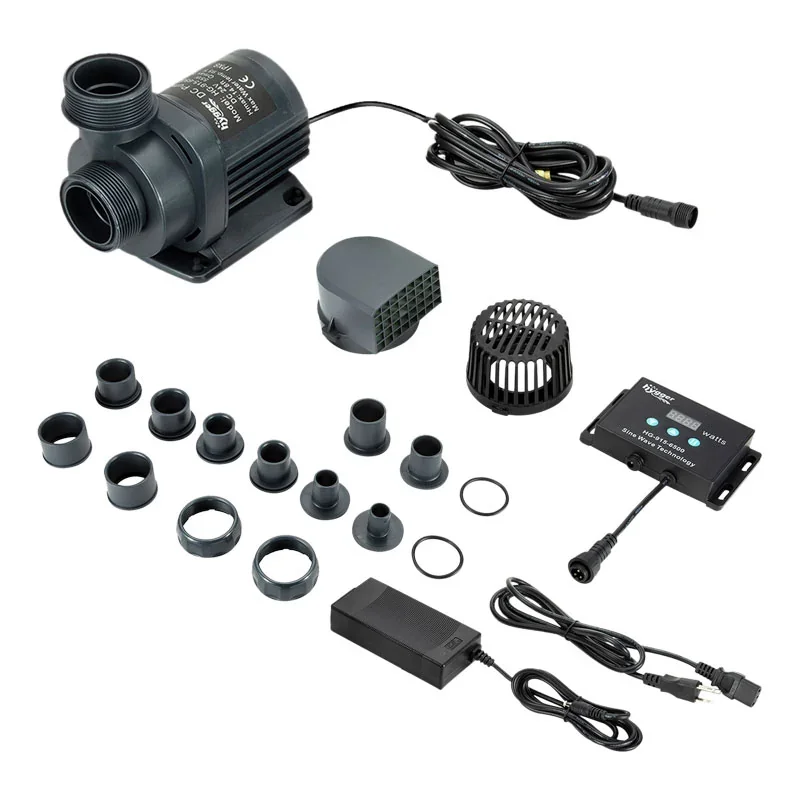
1 × Hygger HG070 Cross-Flow Wave Pump (Selected 12W, 18W, or 25W Model)
1 × DC Power Adapter
1 × Intelligent LCD Controller with Holder
1 × User Manual
The pump includes its magnetic mounting assembly.
Additional HG070 pumps required for multi-pump wireless synchronization are sold separately.
Powerful, Customizable Water Movement for Freshwater and Reef Aquariums
The Hygger Cross Flow Pump HG070 is an excellent choice for aquarium enthusiasts who want stronger circulation, customizable wave patterns, and convenient control.
Its advanced cross-flow design generates broad, natural-looking currents that help move water around decorations, live rock, and other aquarium structures.
With five selectable wave modes, adjustable flow intensity, customizable wave frequency, and an intelligent LCD controller, the HG070 allows users to tailor circulation to their aquarium's requirements.
The built-in ten-minute Feeding Mode, automatic Night Mode, controller key lock, and wireless master/slave synchronization add practical features for everyday aquarium management.
Available in 12W, 18W, and 25W models, the HG070 offers flexible options for compatible freshwater, marine, and reef aquariums.
Order the Hygger Cross Flow Pump HG070 today and create powerful, natural-looking aquarium currents with advanced wave control, convenient feeding functions, and dependable cross-flow circulation.
Order processing time: 3–5 business days
Create powerful, natural-looking water movement throughout your aquarium with the Hygger Cross Flow Pump HG070, an advanced aquarium wavemaker designed to simulate ocean currents, improve water circulation, and reduce stagnant areas in freshwater and saltwater aquariums.
Featuring an innovative cross-flow design, five adjustable wave modes, an intelligent LCD controller, wireless synchronization between compatible HG070 pumps, and convenient feeding and nighttime functions, the Hygger HG070 delivers versatile water movement for fish, corals, and aquatic plants.
Unlike traditional aquarium powerheads that produce a concentrated stream of water, the HG070 uses an elongated cylindrical design to generate a broad, sweeping current. This wider flow pattern helps move water through larger aquarium areas, around rock formations, and across the water surface.
Available in 12W, 18W, and 25W models, the Hygger HG070 provides maximum flow rates ranging from 1,321 GPH to 2,380 GPH, making it suitable for compatible aquariums up to approximately 60, 135, or 265 gallons, depending on the selected model.
With adjustable flow intensity, customizable wave frequency, a magnetic mounting system, and energy-efficient 24V DC operation, the Hygger HG070 offers a practical solution for aquarium owners seeking stronger circulation and more natural aquatic conditions.
Whether you're maintaining a large freshwater aquarium, creating dynamic water movement in a reef tank, improving circulation around live rock, or upgrading a conventional aquarium powerhead, the Hygger HG070 provides advanced wave control in a compact, easy-to-use system.
Benefits of the Hygger Cross Flow Pump HG070
Advanced Cross-Flow Technology: Creates broad, sweeping currents rather than a narrow stream of water.
Five Selectable Wave Modes: Choose Classic Wave Pulse, Sine Wave, Constant Wave, Random Wave, or Classic Wave Cross-Flow.
Three Available Models: Select 12W, 18W, or 25W to match your aquarium requirements.
Powerful Water Movement: Delivers maximum flow rates of 1,321, 1,850, or 2,380 GPH.
Suitable for Freshwater and Saltwater: Designed for compatible freshwater, marine, and reef aquariums.
Intelligent LCD Controller: Conveniently adjust operating modes, flow settings, and wave frequency.
Adjustable Flow Intensity: Customize circulation according to the selected operating mode.
Adjustable Wave Frequency: Fine-tune supported wave patterns to suit aquarium dimensions and livestock.
Wireless Master/Slave Synchronization: Coordinate multiple compatible HG070 pumps without a separate communication cable.
10-Minute Feeding Mode: Temporarily stops water movement during feeding.
Automatic Night Mode: Reduces circulation to the lowest constant-flow setting when the controller detects darkness.
Key Lock Function: Prevents accidental changes to controller settings.
Magnetic Mounting System: Provides convenient installation on compatible aquarium glass.
Flexible Pump Positioning: Install near the surface, middle, or lower section of the aquarium.
Low-Voltage DC Operation: Uses an energy-efficient 24V DC pump system.
Helps Reduce Stagnant Areas: Improves water movement around aquarium decorations and rockwork.
Advanced Cross-Flow Aquarium Technology
The Hygger HG070 uses a cylindrical cross-flow design to generate broad water movement throughout the aquarium.
Traditional powerheads typically direct water through a relatively narrow outlet. Cross-flow pumps distribute water across a wider area, creating a sweeping current that can more closely resemble certain natural water movements.
Broad Water Distribution
The elongated pump body moves water across a wider section of the aquarium.
Natural-Looking Currents
The HG070 can create pulsing, alternating, random, and continuous water movement.
Improved Circulation Around Rockwork
Broad currents help move water around aquarium decorations and live rock structures.
Reduced Low-Flow Areas
Correct placement can help reduce stagnant zones where debris accumulates.
Flexible Aquarium Circulation
The different operating modes allow users to create flow patterns suited to their aquarium's size and inhabitants.
Reef Aquarium Applications
Cross-flow circulation is particularly useful in marine aquariums where water movement is important for many corals and other organisms.
Five Customizable Wave Modes
The Hygger HG070 features five operating modes controlled through its intelligent LCD controller.
Each mode produces a different water movement pattern.
M1 – Classic Wave Pulse Mode
Classic Wave Pulse Mode creates repeated pulses of water movement.
The flow intensity and wave frequency can be adjusted using the controller.
Ideal applications include:
Creating rhythmic aquarium currents
Producing visible surface movement
Simulating repeated wave action
Adding circulation to compatible reef aquariums
M2 – Sine Wave Mode
Sine Wave Mode gradually changes the flow intensity in a smooth, wave-like pattern.
The manufacturer describes flow variation between approximately 30% and 100% during this mode.
Ideal applications include:
Creating smoother changes in water movement
Reducing abrupt transitions between flow levels
Producing natural-looking aquarium currents
Supporting compatible marine and reef environments
M3 – Constant Wave Mode
Constant Wave Mode provides continuous water movement at a selected flow setting.
The flow rate can be adjusted using the controller's plus and minus buttons.
Ideal applications include:
Steady freshwater aquarium circulation
Continuous movement around aquarium decorations
Maintaining a predictable directional current
Supplementing aquarium filtration
M4 – Random Wave Mode
Random Wave Mode changes pump output irregularly.
This creates a less predictable circulation pattern.
Ideal applications include:
Simulating variable ocean currents
Producing changing water movement around rockwork
Reducing reliance on one constant flow pattern
Supporting compatible mixed reef aquariums
M5 – Classic Wave Cross-Flow Mode
Classic Wave Cross-Flow Mode provides a programmable cross-flow wave pattern.
Users can adjust flow intensity and wave frequency through the controller.
Ideal applications include:
Creating dynamic aquarium currents
Improving circulation across larger aquarium areas
Producing changing flow patterns
Enhancing water movement in compatible reef systems
Choosing the Best Mode
The ideal wave mode depends on aquarium dimensions, livestock, decorations, and existing filtration.
Begin with moderate flow and observe how fish, plants, and corals respond before increasing intensity.
Intelligent LCD Controller
The HG070 includes a dedicated LCD controller that allows users to manage the pump's operating functions.
Clear Operating Display
The LCD displays the selected wave mode and other operating information.
Mode Selection
Switch between the five available wave patterns.
Flow Adjustment
Increase or decrease the selected pump output.
Frequency Adjustment
Change the wave frequency in supported modes.
Feeding Mode
Temporarily pause the pump during feeding.
Night Mode
Automatically reduce water movement when the controller detects low-light conditions.
Wireless Linkage
Configure compatible pumps for synchronized operation.
Key Lock
Prevent accidental changes to settings.
Error Indicators
The controller displays diagnostic codes when certain operating problems are detected.
Important: The HG070 uses a dedicated LCD controller. It does not require a smartphone app or Wi-Fi network for its standard operating functions.
Adjustable Water Flow and Wave Frequency
The Hygger HG070 allows users to customize circulation according to their aquarium's needs.
Adjustable Flow Intensity
Use the controller's plus and minus buttons to change pump output.
Variable-Frequency Operation
The pump uses a variable-frequency DC motor to produce different flow patterns.
Customizable Wave Timing
In supported modes, press and hold the MODE/FREQ button to adjust wave frequency.
Flexible Current Strength
Reduce flow for compatible fish and corals that prefer gentler water movement.
Increase flow where stronger circulation is appropriate.
Important Flow Consideration
The maximum GPH rating represents the pump's highest specified flow output.
Actual circulation depends on the selected mode, flow setting, and installation conditions.
Three Available Hygger HG070 Models
The HG070 series is available in three versions.
HG070-12W – 1,321 GPH
The HG070-12W is the most compact model in the series.
Model Highlights:
Model: HG070-12W
Power Consumption: 12W
Maximum Flow Rate: 1,321 GPH
Metric Flow Rate: 5,000 L/H
Manufacturer-Recommended Aquarium Capacity: Up to 60 gallons
Manufacturer-Recommended Aquarium Length: Up to approximately 60 cm / 23.6 inches
Maximum Recommended Glass Thickness: 0.315 inches / 8 mm
Approximate Pump Dimensions: 4.8 × 1.4 inches / 12.2 × 3.6 cm
Operating Voltage: DC 24V
The 12W model is suitable for compatible smaller reef systems and freshwater aquariums requiring broad circulation.
HG070-18W – 1,850 GPH
The HG070-18W provides increased water movement for larger aquarium systems.
Model Highlights:
Model: HG070-18W
Power Consumption: 18W
Maximum Flow Rate: 1,850 GPH
Metric Flow Rate: 7,000 L/H
Manufacturer-Recommended Aquarium Capacity: Up to 135 gallons
Manufacturer-Recommended Aquarium Length: Up to approximately 80 cm / 31.5 inches
Maximum Recommended Glass Thickness: 0.39 inches / 10 mm
Approximate Pump Dimensions: 8.5 × 2 inches / 21.6 × 5 cm
Operating Voltage: DC 24V
The 18W model is designed for compatible medium to large freshwater aquariums, marine displays, and reef systems.
HG070-25W – 2,380 GPH
The HG070-25W is the highest-output model in the series.
Model Highlights:
Model: HG070-25W
Power Consumption: 25W
Maximum Flow Rate: 2,380 GPH
Metric Flow Rate: 9,000 L/H
Manufacturer-Recommended Aquarium Capacity: Up to 265 gallons
Manufacturer-Recommended Aquarium Length: Up to approximately 100 cm / 39.4 inches
Maximum Recommended Glass Thickness: 0.47 inches / 15 mm
Approximate Pump Dimensions: 11.1 × 2.4 inches / 28.2 × 6 cm
Operating Voltage: DC 24V
The 25W model is suitable for compatible larger aquarium systems requiring stronger cross-flow circulation.
Important Model Selection Note
Hygger publishes both aquarium capacity and aquarium length recommendations.
Choose the pump based on tank volume, dimensions, glass thickness, and livestock requirements, rather than relying on gallon capacity alone.
A long aquarium with complex rockwork may require a different circulation arrangement than a shorter aquarium of the same volume.
Wireless Master/Slave Synchronization
The HG070 supports wireless linkage between multiple compatible pumps.
This feature allows aquarium owners to coordinate circulation in larger systems.
Master Controller
One HG070 controller can be designated as the master.
The master controller manages the operating settings for the linked pump group.
Slave Controller
Additional compatible HG070 pumps can be configured as slave units.
The slave pumps follow the master controller's operating pattern.
No Communication Cable Required
The wireless linkage operates between compatible pump controllers without requiring a separate inter-controller cable.
Coordinated Water Movement
Linked pumps can create synchronized circulation patterns across the aquarium.
Suitable for Larger Aquariums
Using multiple pumps can help improve circulation in longer or more complex aquarium layouts.
Important Wireless Clarification
The HG070's wireless function is designed for communication between compatible pump controllers.
It should not be confused with smartphone Bluetooth control, Wi-Fi control, or internet-based remote operation.
Convenient 10-Minute Feeding Mode
The HG070 includes a feeding function that temporarily stops water movement.
Easier Fish Feeding
Strong currents can move food around the aquarium before fish have an opportunity to eat.
Automatic Pump Pause
Press and hold the OFF/FEED button to activate Feeding Mode.
Controller Countdown
The display shows a countdown beginning at approximately Fd10.
Automatic Restart
After ten minutes, the pump automatically resumes its previous operating settings.
Manual Restart
Feeding Mode can be canceled before the countdown finishes.
Practical Aquarium Maintenance
The temporary pause can also be useful during selected short aquarium tasks.
Important: Feeding Mode stops the HG070 circulation pump. It does not automatically stop separate aquarium filters, return pumps, or feeding equipment.
Automatic Night Mode
The HG070 features a Night Mode designed to reduce water movement in low-light conditions.
Light-Sensitive Operation
The controller detects changes in ambient light.
Reduced Nighttime Flow
When Night Mode is enabled and the surrounding area becomes dark, the pump switches to Constant Wave Mode at its lowest flow setting.
Automatic Daytime Return
When the controller detects brighter conditions, the pump returns to its previously selected operating mode.
Convenient Daily Operation
Night Mode provides an automatic way to alternate between normal daytime circulation and gentler nighttime flow.
Important Installation Consideration
The controller must be positioned where its light sensor can detect the intended day-and-night lighting conditions.
Avoid placing it in a permanently dark cabinet if you want Night Mode to follow the aquarium's lighting cycle.
Important Livestock Consideration
Some reef aquariums require substantial circulation throughout the night.
Use Night Mode only when the reduced flow remains appropriate for the aquarium's inhabitants.
Controller Key Lock Function
The HG070 includes a locking function to help prevent accidental setting changes.
Prevent Unwanted Adjustments
The lock helps protect the selected wave mode and flow settings.
Simple Activation
Press and hold the plus and minus buttons together until the lock icon appears.
Easy Unlocking
Press and hold the same buttons until the lock icon disappears.
Useful for Everyday Operation
The feature is particularly convenient when the controller is installed in an accessible location.
Broad Aquarium Water Circulation
The HG070 helps distribute water throughout the aquarium.
Surface Circulation
Position the pump near the upper section of the aquarium to create surface movement.
Mid-Level Circulation
Mounting the pump at mid-level can move water through the primary swimming area.
Lower-Level Circulation
A lower position can help move loose debris near the substrate.
Around Aquarium Decorations
The broad current can improve circulation around rocks and driftwood.
Through Reef Rockwork
Properly directed cross-flow helps move water around live rock structures.
Reduced Stagnant Areas
Additional circulation can help minimize low-flow pockets.
Helps Support Oxygen Exchange
Water movement plays an important role in aquarium gas exchange.
Surface Agitation
Water movement near the surface can increase gas exchange.
Oxygen Distribution
Circulation helps distribute dissolved oxygen through different aquarium areas.
Reduced Stagnation
Moving water helps prevent isolated areas from remaining still.
Supports Aquarium Filtration
Circulation complements existing filtration and aeration equipment.
Important: The HG070 circulates water but does not directly inject air. It is not a replacement for an air pump when dedicated aeration is required.
Helps Keep Loose Debris Moving
Waste particles often collect in low-flow aquarium areas.
The HG070 can help move suspended debris toward the filtration system.
Reduces Debris Accumulation
Appropriate water movement can discourage lightweight waste from settling in certain locations.
Supports Mechanical Filtration
Suspended particles may be captured by the aquarium's filter.
Improves Flow Around Decorations
Broad circulation can help move water through areas behind rockwork.
Useful in Reef Aquariums
Water movement around live rock can help reduce stagnant areas.
Important Maintenance Note
The HG070 is a circulation pump, not a mechanical filter.
It does not remove waste from the aquarium by itself.
Regular water changes, filtration, and substrate cleaning remain necessary.
Suitable for Freshwater Aquariums
The HG070 can be used in compatible freshwater systems.
Large Community Aquariums
Additional circulation can help distribute water throughout larger fish tanks.
River-Style Aquariums
The adjustable modes can create stronger currents for species that naturally inhabit flowing water.
Cichlid Aquariums
Selected cichlid species may benefit from increased water movement.
Large Planted Aquariums
Carefully adjusted circulation can help distribute water around aquatic plants.
Aquariums with Extensive Decorations
Cross-flow circulation can help reach areas behind rocks and driftwood.
Freshwater Flow Consideration
Some freshwater fish and plants prefer calmer conditions.
Avoid excessive currents in aquariums containing delicate fish, shrimp, or plants.
Suitable for Saltwater and Reef Aquariums
The HG070 is particularly useful for marine aquarium circulation.
Reef Aquariums
Variable water movement can help provide appropriate circulation around corals.
Soft Coral Systems
Adjustable wave modes allow flow patterns to be selected according to the needs of compatible soft corals.
LPS Coral Aquariums
Carefully positioned circulation can provide water movement without directing excessive current at delicate coral tissue.
SPS Coral Aquariums
Many SPS corals benefit from substantial and variable water movement.
Marine Fish Displays
Broad currents help move water through rock structures and open swimming areas.
Live Rock Aquariums
Cross-flow circulation can help reduce stagnant zones around reef rockwork.
Important Reef Consideration
Different corals require different flow intensities.
Avoid directing an overly powerful current at delicate coral tissue.
Magnetic Aquarium Mounting System
The HG070 includes a magnetic mounting system designed for compatible aquarium glass.
Secure Attachment
The magnetic base holds the pump against the aquarium wall.
Convenient Installation
No drilling or permanent modification is required.
Flexible Positioning
The pump can be moved to different locations as circulation needs change.
Adjustable Direction
The pump's mounting design allows users to adjust the flow direction.
Model-Specific Glass Thickness Limits
HG070-12W: Up to 8 mm
HG070-18W: Up to 10 mm
HG070-25W: Up to 15 mm
Magnetic Safety
Handle the magnetic components carefully.
Do not allow the magnets to snap together suddenly against aquarium glass.
Quiet and Energy-Efficient DC Operation
The Hygger HG070 uses a low-voltage 24V DC pump system.
Variable-Frequency Motor
The motor adjusts operation according to the selected wave mode.
Energy-Efficient Performance
The series delivers substantial water movement with power ratings of 12W, 18W, or 25W.
Reduced Vibration
Proper magnetic mounting helps limit unwanted vibration.
Quiet Operation
The manufacturer describes the HG070 as designed for low-noise operation.
Maintenance for Quiet Performance
Regular cleaning helps prevent debris buildup and unusual operating noise.
Actual noise depends on pump placement, flow settings, and maintenance.
Suitable Aquarium Applications
The Hygger Cross Flow Pump HG070 is suitable for:
Freshwater community aquariums
Saltwater aquariums
Marine reef aquariums
Soft coral aquariums
LPS coral aquariums
Compatible SPS coral systems
Cichlid aquariums
River-style freshwater aquariums
Large planted aquariums with appropriate flow settings
Marine fish-only aquariums
Fish-only-with-live-rock systems
Aquariums with extensive rockwork
Aquariums with complex decorations
Aquariums requiring variable water movement
Aquariums requiring adjustable wave frequency
Aquariums requiring broad cross-flow circulation
Aquariums requiring synchronized multiple pumps
Aquariums requiring a feeding pause
Aquariums requiring automatic nighttime flow reduction
Aquariums with stagnant water areas
Aquariums requiring supplemental circulation
How to Choose the Right HG070 Model
Choose the 12W Model When
Your aquarium is within Hygger's recommended 60-gallon capacity.
Your aquarium length is approximately 60 cm or less.
Your glass thickness is 8 mm or less.
You need up to 1,321 GPH of cross-flow circulation.
Choose the 18W Model When
Your aquarium is within Hygger's recommended 135-gallon capacity.
Your aquarium length is approximately 80 cm or less.
Your glass thickness is 10 mm or less.
You need up to 1,850 GPH of cross-flow circulation.
Choose the 25W Model When
Your aquarium is within Hygger's recommended 265-gallon capacity.
Your aquarium length is approximately 100 cm or less.
Your glass thickness is 15 mm or less.
You need up to 2,380 GPH of cross-flow circulation.
Consider Aquarium Livestock
Select the model and flow settings according to the needs of your fish, corals, and plants.
Consider Existing Water Movement
Account for return pumps, filter outlets, and other circulation equipment.
Consider Aquarium Dimensions
A long aquarium may require multiple pumps or different placement.
How to Use the LCD Controller
MODE/FREQ Button
Press briefly to cycle through M1–M5.
Press and hold to adjust frequency in supported modes.
Plus and Minus Buttons
Increase or decrease the selected setting.
OFF/FEED Button
Press to turn the pump on or off.
Press and hold to activate the ten-minute Feeding Mode.
Wi-Le/NIGHT Button
Use the button to select independent, master, or slave operation.
Press and hold to activate or deactivate Night Mode.
Key Lock
Press and hold the plus and minus buttons together to lock or unlock the controls.
How to Activate Feeding Mode
Confirm that the pump is operating.
Press and hold the OFF/FEED button.
Check that the controller displays the feeding countdown.
The pump stops temporarily.
Feed the aquarium inhabitants.
Allow the ten-minute countdown to finish.
The pump automatically resumes normal operation.
To resume earlier, press and hold the feeding control again.
How to Activate Night Mode
Position the controller where it can detect ambient lighting changes.
Turn on the HG070.
Select the preferred daytime wave mode.
Press and hold the Wi-Le/NIGHT button.
Confirm that Night Mode is enabled.
When the surrounding environment becomes dark, the pump changes to minimum constant flow.
When brighter conditions return, the pump resumes its previous operating mode.
Press and hold the button again to disable Night Mode if required.
How to Synchronize Multiple HG070 Pumps
Install each compatible HG070 pump according to its instructions.
Connect each pump to its own supplied controller and power adapter.
Turn on the pumps.
Select one controller as the master.
Press the Wi-Le/NIGHT button until the Master indicator appears.
Configure the additional controller as a slave.
Confirm that the Slave indicator appears.
Adjust the master controller's wave mode and operating settings.
Check that the linked pumps respond appropriately.
Position the pumps to create suitable circulation throughout the aquarium.
Important: Wireless synchronization requires multiple compatible HG070 pump units. Additional pumps are not included with a single HG070 package.
Installation and Usage Guidelines
Choose the correct model: Select 12W, 18W, or 25W according to aquarium size and glass thickness.
Inspect the components: Check the pump, controller, power adapter, and mounting system.
Choose a mounting location: Select an area that allows broad circulation.
Check glass thickness: Confirm compatibility with the selected model.
Prepare the magnetic base: Separate the magnetic components carefully.
Position the pump inside the aquarium: Place it against the selected glass surface.
Attach the external magnet: Carefully slide it into position against the outside of the aquarium.
Confirm secure mounting: Ensure the pump is stable.
Adjust the flow direction: Aim the outlet toward the desired circulation area.
Submerge the pump completely: Never operate it without sufficient water.
Install the controller: Keep it in a dry, accessible location.
Connect the pump cable: Align the connector pins correctly.
Secure the connector: Tighten the locking ring where applicable.
Connect the DC adapter: Use the supplied power adapter.
Create a drip loop: Prevent water from traveling toward electrical outlets.
Connect electrical power: Turn on the pump.
Select a wave mode: Choose M1, M2, M3, M4, or M5.
Adjust flow intensity: Start with moderate circulation.
Adjust wave frequency: Customize supported modes.
Monitor aquarium inhabitants: Ensure the flow is appropriate.
Enable optional functions: Configure Feeding Mode, Night Mode, or wireless synchronization as needed.
Recommended Pump Placement
Near the Surface
Creates visible surface movement and can support gas exchange.
At Mid-Level
Helps circulate water through the main swimming area.
Near the Bottom
Can move loose debris along the lower aquarium area.
Along the Aquarium Side
Creates a broad current across the tank.
Around Reef Rockwork
Position the pump to reduce low-flow pockets.
Using Two Pumps
Place compatible pumps strategically to improve circulation across larger aquariums.
Placement Precautions
Avoid aiming powerful currents directly into loose sand or delicate coral tissue.
Keep the pump intake clear of decorations and plants.
Maintenance and Cleaning Guidelines
Regular cleaning helps preserve pump performance.
Disconnect Electrical Power
Always unplug the pump before maintenance.
Remove the Pump Carefully
Separate the magnetic mounting components without allowing them to snap together.
Open the Pump Housing
Rotate the protective basket counterclockwise according to the manufacturer's instructions.
Inspect the Rotor
Check for trapped debris, algae, or other obstructions.
Clean the Blades
Use a soft brush or cloth to remove buildup.
Clean the Pump Housing
Remove debris from accessible internal surfaces.
Inspect the Intake Openings
Ensure water can enter the pump freely.
Check the Magnetic Mount
Remove trapped particles that could scratch aquarium glass.
Reassemble the Pump
Rotate the protective basket clockwise to secure it.
Reinstall the Pump
Mount it securely and confirm full submersion.
Test Operation
Reconnect power and check for normal water movement.
Keep the Controller Dry
Clean the controller exterior with a dry cloth.
Never submerge the controller or adapter.
Troubleshooting Guide
Pump Does Not Start
Check the electrical outlet.
Confirm the adapter is connected.
Inspect the pump for blockages.
Water Flow Is Weak
Check the selected wave mode.
Increase the flow setting if appropriate.
Clean the rotor and intake openings.
Pump Makes Excessive Noise
Inspect the magnetic mounting system.
Check for trapped debris.
Ensure the pump is fully submerged.
Controller Displays Er01
Meaning: Controller overcurrent.
Action: Check the electrical supply and pump operation. Disconnect power if the problem persists.
Controller Displays Er02
Meaning: Controller overtemperature.
Action: Move the controller away from direct sunlight or excessive heat and allow it to cool.
Controller Displays Er04
Meaning: Pump blockage.
Action: Disconnect power and clean the rotor, blades, and pump housing.
Controller Displays Er05
Meaning: Controller overvoltage or undervoltage.
Action: Check the power supply and electrical connections.
Night Mode Does Not Activate
Confirm that Night Mode is enabled.
Check whether the controller is exposed to enough light during daytime and darkness at night.
Wireless Synchronization Does Not Work
Check that the pumps are compatible HG070 units.
Confirm that one controller is set to Master and the others to Slave.
Feeding Mode Does Not Restart
Check the countdown.
Confirm that the controller is functioning correctly.
Pump Vibrates Against the Glass
Inspect the mounting position.
Check for trapped debris between the magnet and aquarium wall.
Important Safety Guidelines
The HG070 pump must remain submerged during operation.
Do not run the pump dry.
Keep the LCD controller and power adapter outside the aquarium.
Do not expose the controller to water splashes.
Disconnect power before cleaning or repositioning.
Do not operate the pump with damaged electrical wiring.
Handle the magnetic mounting system carefully.
Avoid allowing the magnets to snap together against aquarium glass.
Follow the model-specific glass thickness limits.
Keep the pump intake clear of loose decorations and plants.
Avoid excessive flow near delicate fish and corals.
Use the supplied compatible power adapter.
Create a drip loop in electrical cables.
Use an appropriately protected electrical outlet.
Do not disassemble the controller or adapter.
Keep electrical equipment away from children.
Follow the manufacturer's user manual.
Product Specifications
Brand: Hygger
Product Name: Cross Flow Pump
Official Product Name: Cross-Flow Wave Pump
Model Series: HG070
Available Models: HG070-12W, HG070-18W, HG070-25W
Product Type: Variable-Speed Cross-Flow Aquarium Wavemaker
Pump Design: Cylindrical Cross-Flow
Available Power Ratings: 12W, 18W, 25W
Maximum Flow Rates: 1,321 GPH, 1,850 GPH, 2,380 GPH
Metric Flow Rates: 5,000 L/H, 7,000 L/H, 9,000 L/H
Manufacturer-Recommended Aquarium Capacity: Up to 60, 135, or 265 Gallons, Depending on Model
Operating Modes: 5
M1: Classic Wave Pulse
M2: Sine Wave
M3: Constant Wave
M4: Random Wave
M5: Classic Wave Cross-Flow
Flow Adjustment: Yes
Wave Frequency Adjustment: Yes, in Supported Modes
LCD Controller: Included
Wireless Master/Slave Synchronization: Yes, Between Compatible HG070 Controllers
Feeding Mode: 10-Minute Pause
Automatic Night Mode: Yes
Controller Key Lock: Yes
Diagnostic Error Display: Yes
Mounting Method: Magnetic Mount
Electrical Input: AC 100–240V / 50–60Hz
Pump Operating Voltage: DC 24V
Motor Type: Variable-Frequency DC
Installation Type: Fully Submerged Pump with External Controller
Water Compatibility: Freshwater and Saltwater
Primary Applications: Aquarium Circulation, Variable Wave Generation, Surface Agitation, and Supplemental Water Movement
HG070-12W Specifications
Model: HG070-12W
Power Consumption: 12W
Maximum Flow Rate: 1,321 GPH
Metric Flow Rate: 5,000 L/H
Recommended Aquarium Capacity: Up to 60 Gallons / Approximately 230 Liters
Recommended Aquarium Length: Up to 60 cm / 23.6 Inches
Maximum Recommended Glass Thickness: 8 mm / 0.315 Inches
Approximate Pump Dimensions: 4.8 × 1.4 Inches / 12.2 × 3.6 cm
Operating Voltage: DC 24V
HG070-18W Specifications
Model: HG070-18W
Power Consumption: 18W
Maximum Flow Rate: 1,850 GPH
Metric Flow Rate: 7,000 L/H
Recommended Aquarium Capacity: Up to 135 Gallons / Approximately 510 Liters
Recommended Aquarium Length: Up to 80 cm / 31.5 Inches
Maximum Recommended Glass Thickness: 10 mm / 0.39 Inches
Approximate Pump Dimensions: 8.5 × 2 Inches / 21.6 × 5 cm
Operating Voltage: DC 24V
HG070-25W Specifications
Model: HG070-25W
Power Consumption: 25W
Maximum Flow Rate: 2,380 GPH
Metric Flow Rate: 9,000 L/H
Recommended Aquarium Capacity: Up to 265 Gallons / Approximately 1,000 Liters
Recommended Aquarium Length: Up to 100 cm / 39.4 Inches
Maximum Recommended Glass Thickness: 15 mm / 0.47 Inches
Approximate Pump Dimensions: 11.1 × 2.4 Inches / 28.2 × 6 cm
Operating Voltage: DC 24V
Specifications are based on Hygger's official HG070 product information, catalog, and user manual. One manufacturer's wholesale page contains inconsistencies in the aquarium length and capacity labels; the model recommendations above follow the official manual and product catalog. Flow ratings are maximum values and actual output varies according to operating mode and settings.
Package Includes
Each Hygger HG070 model includes:
1 × Hygger HG070 Cross-Flow Wave Pump (Selected 12W, 18W, or 25W Model)
1 × DC Power Adapter
1 × Intelligent LCD Controller with Holder
1 × User Manual
The pump includes its magnetic mounting assembly.
Additional HG070 pumps required for multi-pump wireless synchronization are sold separately.
Powerful, Customizable Water Movement for Freshwater and Reef Aquariums
The Hygger Cross Flow Pump HG070 is an excellent choice for aquarium enthusiasts who want stronger circulation, customizable wave patterns, and convenient control.
Its advanced cross-flow design generates broad, natural-looking currents that help move water around decorations, live rock, and other aquarium structures.
With five selectable wave modes, adjustable flow intensity, customizable wave frequency, and an intelligent LCD controller, the HG070 allows users to tailor circulation to their aquarium's requirements.
The built-in ten-minute Feeding Mode, automatic Night Mode, controller key lock, and wireless master/slave synchronization add practical features for everyday aquarium management.
Available in 12W, 18W, and 25W models, the HG070 offers flexible options for compatible freshwater, marine, and reef aquariums.
Order the Hygger Cross Flow Pump HG070 today and create powerful, natural-looking aquarium currents with advanced wave control, convenient feeding functions, and dependable cross-flow circulation.